
Short answer: Link previews on Slack, LinkedIn, X, and Facebook are powered by Open Graph meta tags, especially
og:image. I fixed ours by designing a 1200x630px image with Bulktopus and ChatGPT for the mockup, then adding it to the codebase. The site now generates a unique preview image per page automatically.
Those preview images you see on Slack, LinkedIn, Twitter (X), or Facebook when someone shares a link? They're called link previews, and they're still not that easy to make.
Yes, there are services and APIs to help, but they all come with little annoyances depending on your experience. For me, I'm a total noob at this. Honestly, I didn't even want to do it. But these are the little things that make a brand. Imagine sending your startup site to an investor on LinkedIn chat and it just shows a blank gray box. This is my experience fixing it.
What even is Open Graph?
If you ask your favorite AI agent "I want to improve link previews on social sites, guide me," you'll get something like: "Implement Open Graph meta tags and a Twitter Card."
Open Graph is a protocol originally developed at Facebook that lets any web page describe itself as a rich object when it's shared. Every page needs four core tags: og:title, og:type, og:image, and og:url. That's what tells Slack, LinkedIn, X, and Facebook what title, description, and image to show when someone shares your link.
The catch: you actually need to design a proper image, and add it to your codebase.
Choosing a tool
I don't want to design images manually. I have no design skill. There are a bunch of options, but I ended up using Bulktopus. It's free, doesn't require sign-up for the basic tools, has no-code design, and comes with pre-built sizes for OG images.
It has limitations though: few design options (colors, typography, fixed text locations), and I found I had to share to X or LinkedIn before I could download, which was annoying. But it works.
The hardest part was the design itself. Luckily, ChatGPT helped brainstorm colors, text, and layouts, and even generated mockups. I couldn't replicate everything exactly in Bulktopus because of its limits, but it was enough to get started.
Here's the OG image I ended up with:
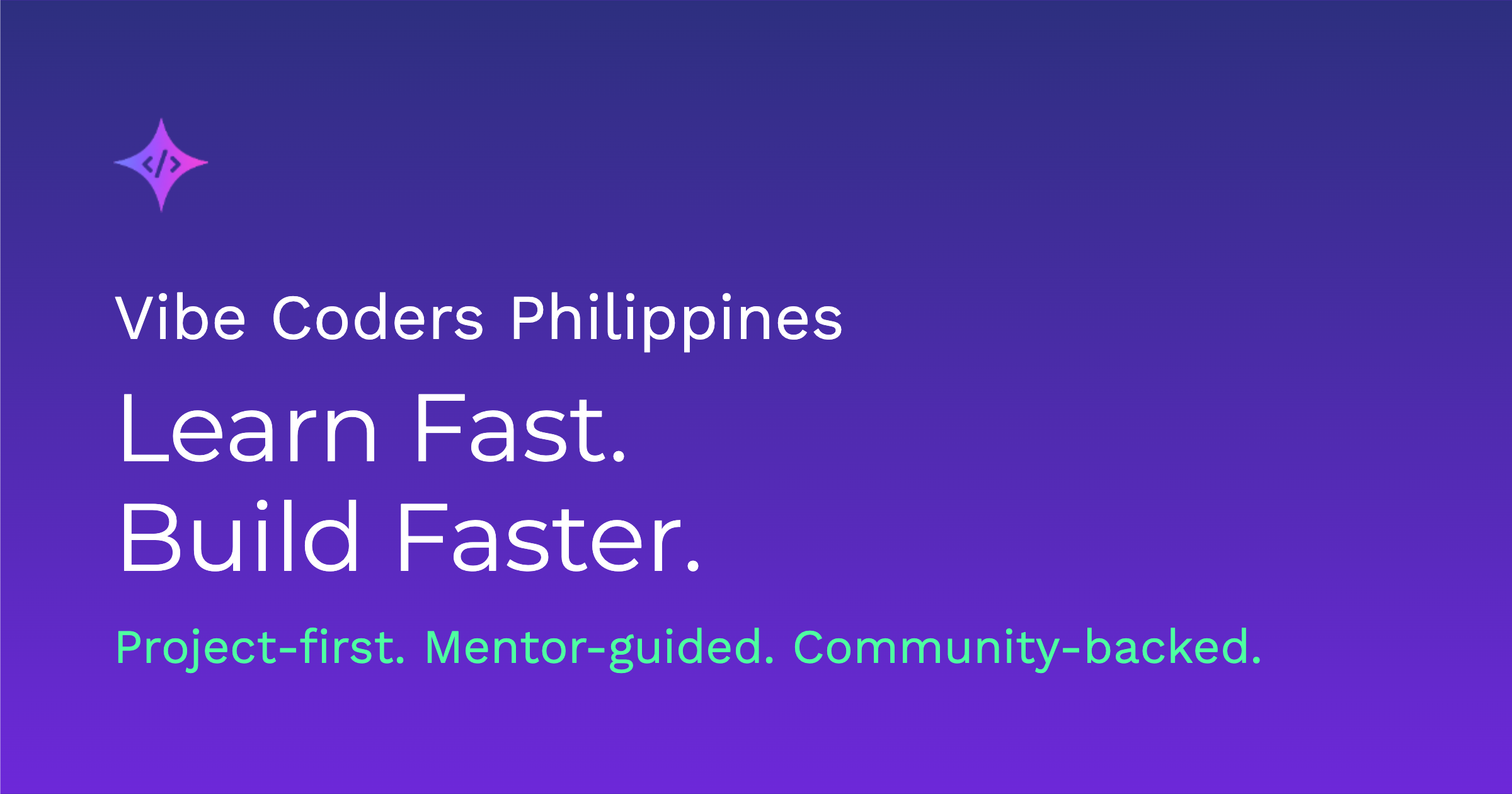
Saved as /public/og-image.png (1200x630px).
More pages need more OG images
My coding agent suggested creating different OG images for different pages: /public/og-image.png for the main site, a projects-page version, a course version, and one per blog post. That means different statements, maybe even slight design changes for each. I left that as an exercise for our core members at the time.
The bigger idea: automating OGs
Here's where I started thinking about a business opportunity. What I actually wanted was for my coding agent, already aware of my brand, colors, text, and logo, to just make all OG images automatically and integrate them into the codebase.
With MCP (see our MCP guide), an AI agent could generate branding copy and design, create multiple OG variants, place them in the right folders, and update the meta tags automatically. Basically, recreate my whole workflow end to end. I still think that's worth building.
Update, September 2026
We did eventually automate it. The site now generates a unique OG card per post at build time, at /og/blog/<slug>.png, pulling the post's category, title, author, and read time straight from its content instead of a hand-designed image. You can see one live at /blog/what-is-vibe-coding. No more Bulktopus round-trip for every new post, though the hand-designed brand version documented above is still what set the visual direction.
Frequently asked questions
Why did the link preview show a blank gray box before I added an image?
Without an og:image tag, or with a broken image path, most platforms fall back to a blank placeholder or skip the image entirely. The og:image tag has to point to a reachable, correctly sized image for the preview to render.
What size should an OG image be?
1200x630px is the standard most guides and tools, including Bulktopus, build around, and it renders correctly on Facebook, LinkedIn, X, Slack, and Discord. Facebook's own guidance caps the file at 8MB.
How do I check whether my OG tags are actually working?
Use Facebook's Sharing Debugger to preview how a link renders on Facebook and catch tag errors, and LinkedIn's Post Inspector to do the same for LinkedIn. Both also force the platform to re-scrape a cached preview.
Can Next.js generate OG images automatically instead of designing them by hand?
Yes. Next.js supports an opengraph-image file convention: either drop in a static image per route, or export a function using ImageResponse from next/og to generate one in code, per page, at build time.
Do I need a different OG image for every single blog post?
Not strictly, but it helps. A generic site-wide image works for the homepage and static pages; per-post images that include the post title give sharers more context and tend to get more clicks.
Sources
- The Open Graph protocol.
- opengraph-image and twitter-image file conventions, Next.js documentation.
- Sharing Debugger, Meta for Developers.
- LinkedIn Post Inspector, LinkedIn.
- Bulktopus, OG image generator.